
In the AI data infrastructure race, Oracle wants you to run AI inside your database. Not call an API. Not ship your data to an external LLM company. Not stand up a separate vector database. Run the whole thing on-prem, behind your firewall, managed by your data team.
That’s what the Private AI Services Container is for. It’s a Docker/Podman image that runs embedding models on your infrastructure. Your database calls it over HTTP, sends it text, gets a vector back. No data leaves your network. No per-token billing. No third-party API keys for your security team to argue about.
The pitch makes sense for anyone running business applications on Oracle. You have ERP data, HR data, financial data sitting in the database. You want to search it by meaning, not just by keyword. You want a support engineer to type “customer can’t log in after password reset” and find every related ticket, not just the ones with those exact words. Oracle’s position is that you shouldn’t need a separate AI stack to do this. Add a container, point DBMS_VECTOR at it, and your existing data becomes semantically searchable.
This post is not going to pretend to market that concept. The jury is still out on how data architectures and AI deployment patterns will shake out for enterprises. Instead, this post shows you how to implement Oracle’s on-prem AI stack and what you can actually use it for. I deployed the Private AI Container on OpenShift, installed Ollama for LLM generation, and wired both into the database via DBMS_VECTOR. The embedding pipeline works end to end. LLM text generation from SQL works. Select AI NL2SQL over HTTP does not (ORA-20047), and the container needed some persuading before it would run on OpenShift.
Oracle Private AI Services Container explained
The Private AI Services Container is an embedding inference engine. It runs ONNX models that convert text (or images) into vectors. It does not run LLMs. It does not do prompting. It does not generate SQL.
The other half of the AI stack is an LLM. Oracle doesn’t ship one. You bring your own: Ollama, vLLM, Llamafile, or any OpenAI-compatible server. The database talks to the LLM through a different code path (DBMS_VECTOR.UTL_TO_GENERATE_TEXT or DBMS_CLOUD_AI.CREATE_PROFILE).
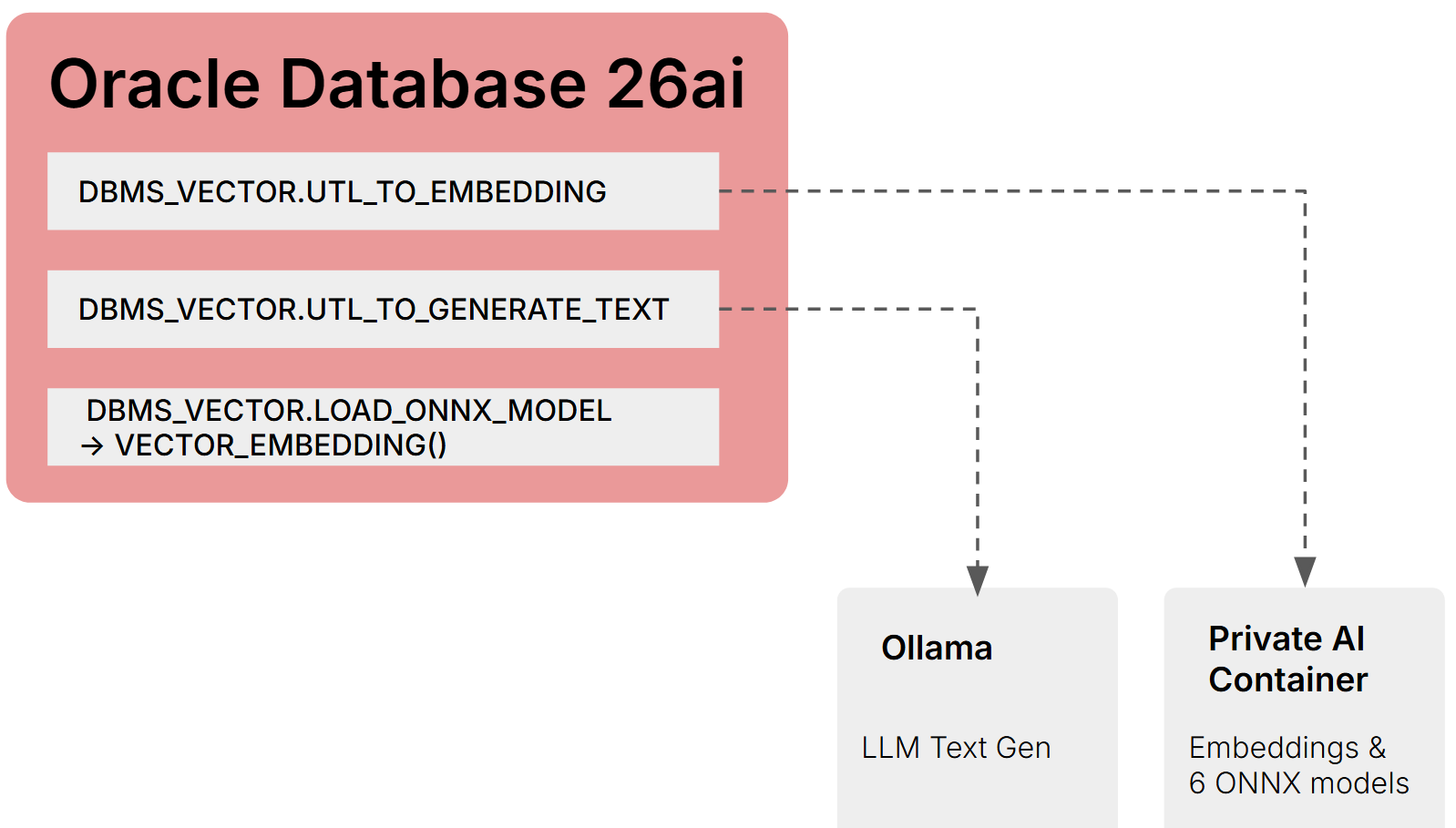
The documentation doesn’t make this two-component split obvious. If you’re building a RAG pipeline on-prem, you need both. Semantic search alone only needs the embedding side. NL2SQL only needs the LLM side.
There’s also a third option for embeddings: skip the container entirely and load ONNX models directly into the database via DBMS_VECTOR.LOAD_ONNX_MODEL. Once loaded, you generate embeddings in SQL with no HTTP call and no external dependency:
SELECT VECTOR_EMBEDDING(MY_MODEL USING 'search text' AS data) FROM DUAL;
The tradeoff is setup complexity. You need OML4Py 2.1 Client (Python 3.12, Linux x64 only) to convert Hugging Face models to Oracle’s ONNX format using ONNXPipeline and ONNXPipelineConfig, then export2db() to push the model into the database. Once it’s there, no container, no network, no HTTP latency. I didn’t set up OML4Py in this lab, so the in-database route is documented here but not tested.
Three deployment patterns for embeddings on-prem:
| Pattern | Embedding source | Requires | HTTP call |
|---|---|---|---|
| Private AI Container | Container on Podman/K8s | Container runtime, network ACL | Yes |
| In-database ONNX | Model loaded into Oracle | OML4Py for conversion, x86-64 Linux | No |
| Ollama / OpenAI-compatible | External server | Network ACL | Yes |
For LLM text generation, there’s only one pattern on-prem: an external server called via DBMS_VECTOR or DBMS_CLOUD_AI. Oracle does not support loading LLM-scale models into the database.
Six embedding models ship with the container:
| Model | Dimensions | Type |
|---|---|---|
| all-MiniLM-L12-v2 | 384 | Text |
| all-mpnet-base-v2 | 768 | Text |
| multilingual-e5-base | 768 | Multilingual |
| multilingual-e5-large | 1024 | Multilingual |
| clip-vit-base-patch32-txt | 512 | Text/CLIP |
| clip-vit-base-patch32-img | 512 | Image/CLIP |
The image (5.2GB) is on Oracle Container Registry and requires SSO login with license acceptance. CPU only in 23.26.1. GPU support is referenced in the docs but not available yet.
Getting the container running on OpenShift
On Podman it’s one command:
podman run -d --name privateai -p 8080:8080 \
  container-registry.oracle.com/database/private-ai:25.1.3.0.0
On OpenShift it crash-looped three times before I figured out what it needed.
The container runs as root. OpenShift assigns a random UID by default. The entrypoint checks write permissions on /privateai/logs and exits if it can’t write.
oc adm policy add-scc-to-user anyuid -z default -n oracle-ai
OpenShift pre-mounts /run/secrets/ with Kubernetes and RHSM directories. The container hardcodes OML_SECRETS_MOUNTPOINT=/run/secrets and expects keystore, password, and API key files there. Mounting a Kubernetes secret volume at /run/secrets replaces the existing content. Use subPath mounts for individual files so they coexist with the pre-existing directories.
Even in HTTP mode, the entrypoint validates that the secret files exist. You need dummy secrets:
kubectl create secret generic privateai-secrets -n oracle-ai \
  --from-literal=keystore=dummy \
  --from-literal=privateai-ssl-pwd=dummy \
  --from-literal=api-key=dummy
The container also defaults to HTTPS on port 8443. For HTTP:
MICRONAUT_SERVER_SSL_ENABLED=false
MICRONAUT_SERVER_PORT=8080
I found all of this by reading the entrypoint script and watching error logs. None of it is in the installation documentation.
Embeddings from SQL
With the container running and network ACLs granted to the database user, generating an embedding is one function call:
SELECT DBMS_VECTOR.UTL_TO_EMBEDDING(
  'Oracle AI Database 26ai is a powerful database',
  JSON('{"provider":"privateai",
         "url":"http://10.21.227.210:32469/v1/embeddings",
         "host":"local",
         "model":"all-minilm-l12-v2"}')
) AS embedding FROM DUAL;
384-dimensional FLOAT32 vector comes back in 1-2 seconds. The API is OpenAI-compatible.
Other on-prem provider values for DBMS_VECTOR: "database" (in-database ONNX), "ollama", or "openai" with host:"local" for any OpenAI-compatible server. Cloud providers (OpenAI, Cohere, Google, Hugging Face, etc.) work too with network access and credentials.
Batch embedding via UTL_TO_EMBEDDINGS (plural) processes multiple inputs per REST request. For a full document pipeline: UTL_TO_TEXT → UTL_TO_CHUNKS → UTL_TO_EMBEDDINGS in a single SQL statement.
LLM text generation via Ollama
Ollama installation on Oracle Linux needed zstd before the installer would work:
dnf install -y zstd
curl -fsSL https://ollama.com/install.sh | sh
ollama pull qwen2.5-coder:1.5b
No GPU detected. CPU-only. The 1.5b parameter model is small enough that responses come back in a few seconds.
SELECT DBMS_VECTOR.UTL_TO_GENERATE_TEXT(
  'What is Oracle Database in one sentence?',
  JSON('{"provider":"ollama","host":"local",
         "url":"http://localhost:11434/api/generate",
         "model":"qwen2.5-coder:1.5b"}')
) AS llm_response FROM DUAL;
Returns natural language text from the local LLM. This is DBMS_VECTOR, not DBMS_CLOUD_AI. That distinction is about to matter.
Select AI doesn’t work on-prem over HTTP
Oracle’s Select AI lets you write SELECT AI showsql How many sales were made last month. It translates natural language to SQL using an LLM, powered by DBMS_CLOUD_AI.CREATE_PROFILE.
The documentation shows this working with Ollama using provider "openai" and a custom endpoint:
BEGIN
  DBMS_CLOUD_AI.CREATE_PROFILE(
    profile_name => 'OLLAMA_LOCAL',
    attributes => '{"provider":"openai",
      "credential_name":"OLLAMA_CRED",
      "model":"qwen2.5-coder:1.5b",
      "provider_endpoint":"http://localhost:11434"}');
END;
/

ORA-20047: Invalid value for attribute - provider_endpoint
Tried "localhost:11434". Tried "http://localhost:11434/v1". All rejected. DBMS_CLOUD_AI will not accept HTTP endpoints on-prem in 23.26.1.
On Autonomous Database this works because the endpoints are HTTPS. On-prem with Ollama over HTTP, it doesn’t. The workaround is DBMS_VECTOR.UTL_TO_GENERATE_TEXT with provider "ollama", which handles raw LLM calls but doesn’t give you the Select AI NL2SQL syntax. You’d have to build your own NL2SQL layer around it.
Putting Ollama behind a TLS-terminating reverse proxy might fix this. That’s next on the list.
Where this leaves on-prem AI adoption
The building blocks are real. Embedding generation works from SQL. LLM text generation works from SQL. The Private AI Container runs on standard container infrastructure. Ollama runs on the database server itself. For semantic search over enterprise data, the stack is functional today.
The gap is Select AI. NL2SQL is the feature Oracle demos on stage, and it doesn’t work on-prem over HTTP in 23.26.1. If you need natural language queries against your Oracle data, you’re either putting an LLM behind HTTPS, building your own NL2SQL layer with DBMS_VECTOR, or waiting for Oracle to fix ORA-20047.
For teams evaluating this: start with the embedding pipeline. It’s the part that works cleanly and delivers immediate value. Semantic search over existing application data is a use case you can deploy without solving the LLM endpoint problem first.