
I spent months building a tool that answers a question nobody else was asking: how many databases can your infrastructure actually handle before something breaks? HammerDB-Scale orchestrates parallel database benchmarks on Kubernetes, correlates application metrics with storage behaviour, and finds consolidation limits.
I also overengineered it for the wrong user experience. But I thought it was brilliant at the time. Pull the GitHub repo, it’ll be fine! Navigate the shell scripts, figure out which positional arguments go where, manually watch kubectl output, remember the Helm release naming convention for cleanup. Brilliant, just brilliant.
Version 2.0 is the admission that it wasn’t fine. It’s a Python CLI on PyPI. Five commands from install to a shareable report. You’re welcome for your coffee break back!
pip install hammerdb-scale
hammerdb-scale init
hammerdb-scale validate
hammerdb-scale run --build --wait
hammerdb-scale report --open
If you’re validating storage for database consolidation, sizing a platform for multiple production instances, or comparing infrastructure options under realistic workloads, that’s the workflow. Run it and go do something more interesting while the tool does its thing.
Get-it-Done Workflow
init --interactive walks you through a 6-step wizard: target databases, credentials, benchmark type (TPC-C or TPC-H), warehouse count, virtual users, duration. It asks the questions in order, shows you a summary at the end, and writes a YAML config with inline comments explaining every field. The config uses defaults inheritance, so eight Oracle databases with the same credentials is eight two-line entries (name and host) under a shared defaults block.
validate is where you find out whether you’ve done something stupid before Kubernetes finds out for you. It checks your YAML, your schema, your container images, your Helm and kubectl installs, your namespace and RBAC permissions, and your database connectivity. For Oracle, it maps ORA errors to specific guidance rather than leaving you to interpret a stack trace. This alone would have saved me hours in the early days.
run --build --wait builds benchmark schemas on every target and executes the workload. Each database gets its own Kubernetes job running HammerDB in parallel. Test IDs are auto-generated (name-YYYYMMDD-HHMM) so you don’t have to sit there inventing naming conventions. While it runs, status --watch shows live progress in a coloured terminal table and logs --follow streams output per target.
results aggregates metrics from all completed jobs. report turns them into an HTML scorecard.
The Scorecard
The distribution chart is where the interesting findings live. Uniform bars mean your infrastructure is balanced. Skew means a specific target is struggling or a shared resource is creating contention. That pattern is what turns a benchmark into a capacity planning decision.
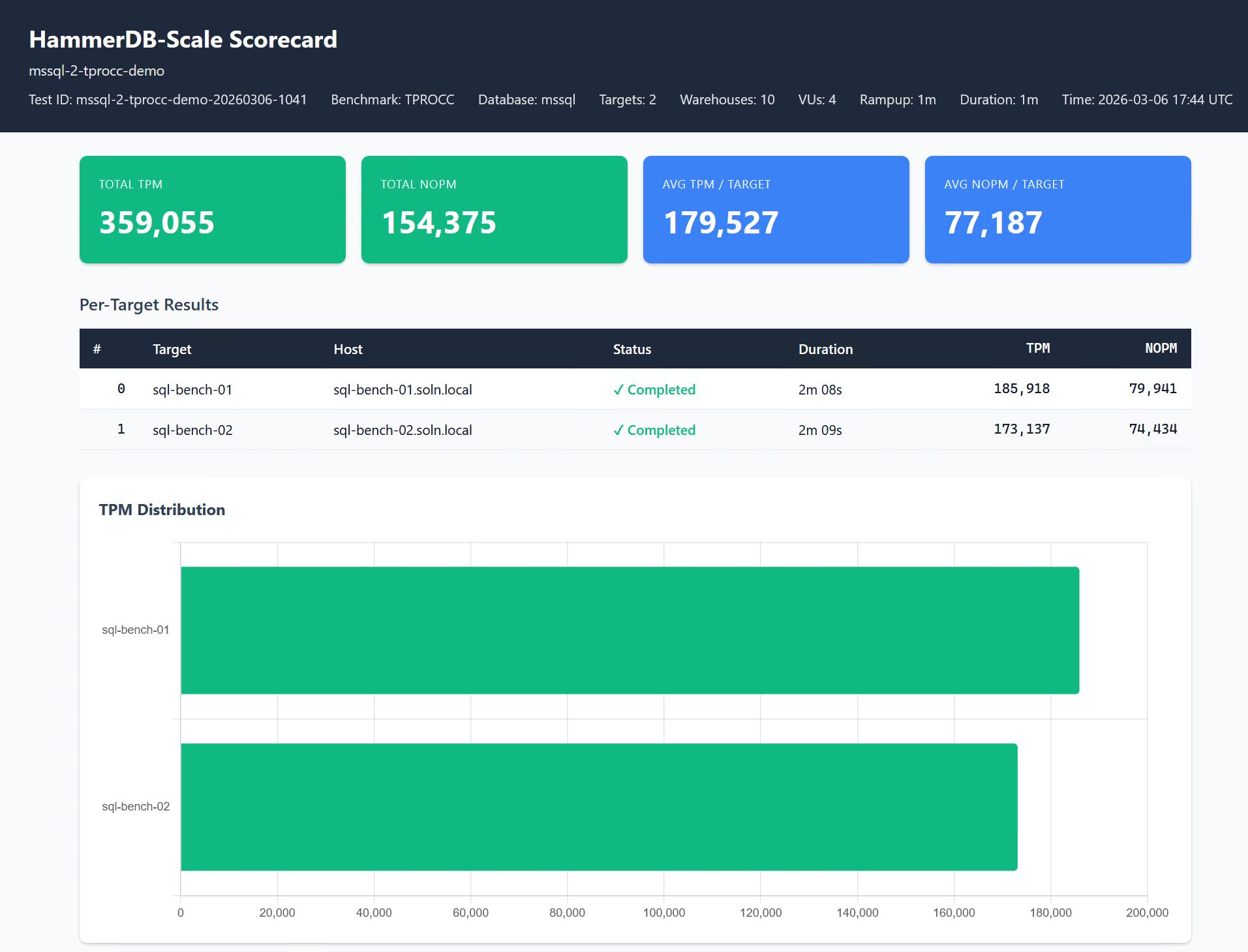
hammerdb-scale report produces a single HTML file with no external dependencies. No CDN, no Grafana, no dashboard to maintain. Open it in a browser, email it, attach it to a Jira ticket, print to PDF. Summary cards show aggregate metrics (total TPM and NOPM for TPC-C, or QphH for TPC-H). A per-target table shows individual performance with colour-coded status.
When Everpure metrics are enabled, the scorecard adds storage correlation: latency, IOPS, and bandwidth over the test duration, so you can see what the storage was doing while the benchmark ran.
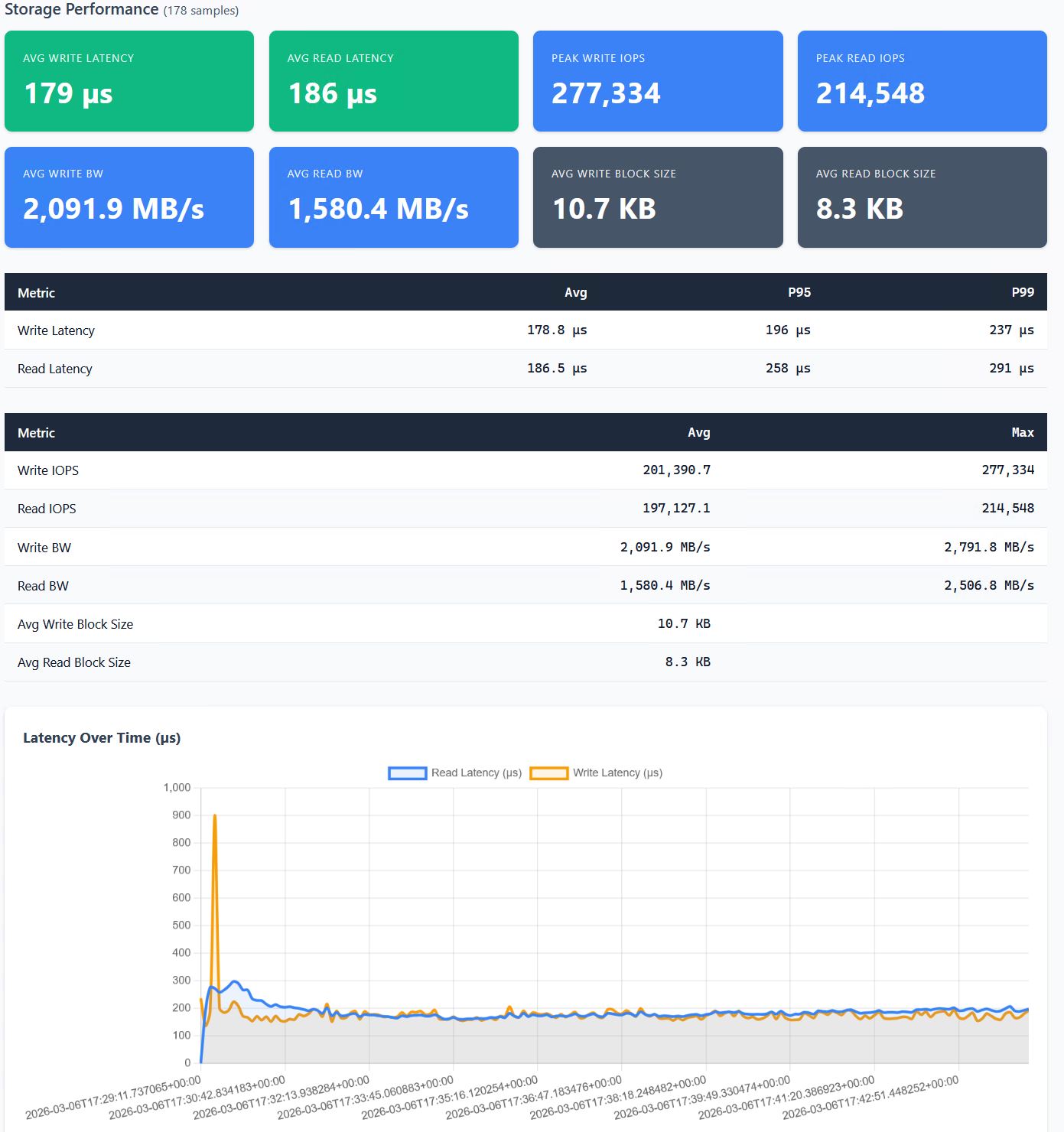
The point of this tool is connecting what the database sees with what the infrastructure is doing. TPM dropping while write latency spikes tells you a different story than TPM dropping while CPU saturates. The scorecard puts both on the same page.
In my own consolidation testing, performance peaked at two SQL Server databases and degraded as density increased. Write latency went from 126 microseconds with a single instance to nearly 5 milliseconds at eight, while IOPS plateaued around 170K regardless of how many databases were competing for them. The storage had hit a wall, but you’d never know that from testing one database at a time. Two databases: fine. Four: stressed. Eight: practical limit reached.
Getting Started
This tool tests real infrastructure with real databases. You need Python 3.10+, a Kubernetes cluster with Helm, and database targets already running. If you have those, you’re 30 minutes from a scorecard. If you don’t, I can’t help you with that part.
Oracle and SQL Server are both supported today. SQL Server works with the public container image out of the box. Oracle requires building your own image because Oracle’s licensing prevents redistribution of Instant Client in containers. It’s a five minute build. Instructions in ORACLE-SETUP.md. Annoying, but not complicated.
Start small. Two or three targets, 100 warehouses, five minute duration. You’ll have a complete run and a scorecard you can actually look at before deciding whether to scale up. The interesting findings come when you increase density until something in the infrastructure gives. That’s the whole point.
When you’re done, hammerdb-scale clean handles Kubernetes resources and database tables. --dry-run shows the SQL before executing.
Full documentation, example configs, and the command reference are in the GitHub repo. PostgreSQL and MySQL are on the roadmap. Pull requests welcome.
If you try it and something breaks, file an issue. If you find an interesting consolidation limit, I want to hear about it. Find me on LinkedIn.
Built on HammerDB by Steve Shaw