
Oracle ranks #1 on the DB-Engines database popularity ranking, ahead of MySQL, SQL Server, and PostgreSQL. Running Oracle benchmarks alongside SQL Server in my day-to-day testing made perfect sense from the start, but HammerDB-Scale v1.0 focused on getting SQL Server working properly first.
Version 1.1 adds Oracle support with the same parallel orchestration framework that makes testing multiple SQL Server instances straightforward. Same Helm chart, same values.yaml structure, same workflow. Plus configurable transaction pacing (the keyandthink parameter) that was hardcoded in v1.0 is now exposed as a simple toggle for switching between storage stress testing and realistic user simulation.
Understanding the Two-Image Architecture
Oracle licenses Instant Client under terms that prevent redistribution in container images. I can’t ship a ready-to-use Oracle container. You can’t just pull it from a registry.
This creates friction but doesn’t actually gatekeep. It’s an odd licensing stance. Oracle makes client proliferation more difficult, which limits hobbyist adoption and adds setup steps, but doesn’t prevent you from building and using the tooling. You download it yourself, build it once, and you’re done. Annoying? Yes. Insurmountable? No. Just one more reason the Oracle ecosystem feels heavier than it needs to be.
The two-image architecture:
HammerDB-Scale uses a base image (sillidata/hammerdb-scale:latest) that contains SQL Server drivers and all the core HammerDB framework. This image is publicly available and works for SQL Server testing without any additional steps.
For Oracle, there’s a separate Dockerfile.oracle that extends the base image and downloads Oracle Instant Client 21.11 directly from Oracle during your build. You build this extended image once in your environment, push it to your private registry, and reference it in your deployments.
Building the Oracle image:
# Clone the repo if you haven't already
git clone https://github.com/PureStorage-OpenConnect/hammerdb-scale
cd hammerdb-scale

# Build the Oracle-enabled image
docker build -f Dockerfile.oracle -t myregistry/hammerdb-scale-oracle:latest .

# Push to your private registry
docker push myregistry/hammerdb-scale-oracle:latest
The build downloads Instant Client from Oracle, installs it into the container, and configures the Oracle-specific HammerDB TCL scripts. Takes about five minutes. Once it’s in your registry, you’re done with the build process.
Note – if you push the image to your docker repo, make sure to set it as private, Oracle’s licensing restricts distribution – which is why I cant bundle it in the core image or provide access to mine.
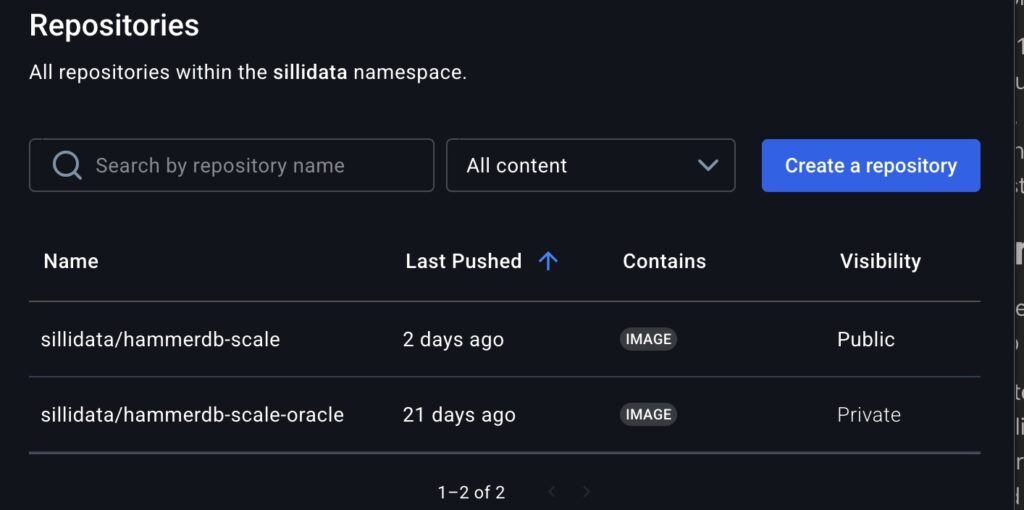
Using it in deployments:
The configuration structure is identical to SQL Server. Change type: mssql to type: oracle, add the Oracle service name, and reference your Oracle-enabled image:
global:
  image:
    repository: myregistry/hammerdb-scale-oracle
    tag: latest

targets:
  - name: oracle-prod
    type: oracle
    host: "oracle.example.com"
    username: system
    password: "YourPassword"
    oracleService: "ORCL"

  - name: sql-server-prod
    type: mssql
    host: "sqlserver.example.com"
    username: sa
    password: "YourPassword"

hammerdb:
  tprocc:
    warehouses: 1000
    duration: 10
Same workflow as SQL Server testing. Configure targets, set warehouse count and duration, deploy. The only Oracle-specific field is oracleService.
Oracle customization options:
Oracle has additional configuration parameters if you need to customize tablespaces, users, or query parallelism:
databases:
  oracle:
    service: "ORCL"                    # Oracle service name
    tablespace: "TPCC"                 # Data tablespace (default: TPCC)
    tempTablespace: "TEMP"             # Temp tablespace (default: TEMP)
    tprocc:
      user: "tpcc"                     # TPC-C schema user (default: tpcc)
    tproch:
      user: "tpch"                     # TPC-H schema user (default: tpch)
      degreeOfParallel: 8              # Query parallelism for TPC-H
Most deployments work fine with defaults. These exist for environments with specific tablespace requirements or custom schema configurations.
See docs/databases/ORACLE-SETUP.md for complete setup instructions.
That gets Oracle working. The second change makes the testing more useful by controlling how you stress the system.
Transaction Pacing with keyandthink
TPROC-C has a keyandthink parameter that controls transaction pacing. Previous versions hardcoded it to false. If you wanted realistic user simulation, you had to edit TCL scripts manually. Version 1.1 makes it configurable via values.yaml.
keyandthink: false – Back-to-back transactions with no delays. Maximum I/O pressure and sustained write load. This exposes storage bottlenecks, latency behavior under pressure, and IOPS ceilings. Storage vendors testing worst-case scenarios want this setting.
keyandthink: true – 18 seconds keying plus 12 seconds thinking between transactions. This mimics how actual users work: enter data, read results, think about next action, repeat. Transactions spread over time instead of hammering the system continuously. Capacity planners modeling realistic concurrent user load want this setting.
hammerdb:
  tprocc:
    warehouses: 1000
    keyandthink: false  # Maximum storage stress
    duration: 10
One line in values.yaml changes the behavior. Redeploy to test different scenarios.
Does it actually make a difference? Here’s data from a small 100-warehouse test system:
| Setting | NOPM | TPM |
|---|---|---|
| keyandthink: false | 2,363 | 6,136 |
| keyandthink: true | 2,236 | 5,823 |
| Difference | ~5.7% higher | ~5.4% higher |
The difference is minimal (~5%) because 100 warehouses is too small to create real storage stress. The dataset fits largely in the buffer pool, so there’s not enough I/O contention to show dramatic differences between sustained and bursty load patterns.
For storage stress testing where this parameter really matters, you need larger warehouse counts. At 500-1000+ warehouses, the dataset exceeds available memory and forces real disk I/O. That’s where you’ll see sustained write load (keyandthink: false) create very different storage behavior compared to bursty patterns with idle periods (keyandthink: true). The small test just demonstrates the configuration works; proper storage qualification needs scale.
Oracle Database Optimizations
For Oracle specifically, here are optimizations I used on a 1000-warehouse environment to create memory pressure and force I/O to storage:
alter system set filesystemio_options = setall scope=spfile;
alter system set sga_max_size          = 90G scope=spfile;
alter system set sga_target            = 90G scope=spfile;
alter system set pga_aggregate_target  = 24G scope=spfile;
alter system set pga_aggregate_limit   = 48G scope=spfile;
alter system set log_buffer            = 1073741824 scope=spfile;
alter system set fast_start_mttr_target = 60;
alter system set db_writer_processes   = 8 scope=spfile;
Constraining SGA and PGA relative to database size forces more data to disk instead of hiding in cache. Increasing db_writer_processes to 8 helps sustain write throughput under load. Adjust these based on your warehouse count and available memory. The goal is generating consistent storage I/O, not production tuning.
Why This Matters
Testing consolidated infrastructure means testing the databases that actually run on it. Oracle dominates enterprise deployments. Ignoring it produces incomplete results. You don’t get to pretend Oracle doesn’t exist just because the licensing model is annoying.
Before v1.1, testing Oracle alongside SQL Server meant separate tools, different methodologies, and results that weren’t directly comparable. Now it’s one Helm chart, consistent approach, and metrics you can actually compare side by side. That matters because “how does this platform handle mixed Oracle and SQL Server workloads” is a question with budget implications, not a theoretical exercise.
How to Implement It
HammerDB-Scale v1.1: github.com/PureStorage-OpenConnect/hammerdb-scale
Oracle setup requires building your own image (licensing restrictions). Instructions in docs/databases/ORACLE-SETUP.md. Build takes five minutes. Push to your registry, reference in deployments, done. Oracle’s licensing adds friction but doesn’t actually prevent anything.
Existing v1.0 configurations work without changes. Optional: Add keyandthink: false explicitly to values.yaml (was implicit default in v1.0).
What’s Next
PostgreSQL and MySQL/MariaDB are on the roadmap. Pull requests are welcome if you want to contribute. Framework exists; additional databases are mostly TCL script variations.
Testing consolidated platforms and finding interesting bottlenecks? I want to hear about it. What broke first? How did Oracle and SQL Server compete for resources? What did keyandthink: false reveal about your storage that keyandthink: true hid? Find me on LinkedIn.
Built on HammerDB by Steve Shaw